


A help desk ticket is a record of a request for support. It brings together the person asking for help, the issue or request, the conversation, the person responsible and the outcome. Instead of searching through separate emails to find out what happened, the support team has one place to follow the work.
The ticket is not the fix itself. It is the record that makes the fix traceable. This guide explains what belongs in a ticket, how it moves through a support queue and what to look for when software is meant to manage that process.
What should a help desk ticket contain?
A useful ticket gives the next person enough context to continue the work without starting the conversation again. Field names vary between systems, but these are the essentials.
| Information | Why it matters |
|---|---|
| Ticket reference | Gives the request a stable identifier for replies and follow-up. |
| Requester and contact details | Identifies who needs help and how to reach them. |
| Clear subject and description | States what is wrong, or what is being requested, with enough detail to investigate. |
| Impact and urgency | Explains who is affected, what work is blocked and whether a workaround exists. |
| Owner and current status | Shows who is responsible and what should happen next. |
| Conversation and work notes | Keeps questions, evidence, actions and decisions together. |
| Resolution and confirmation | Records what changed and whether the requester can work again. |
Collect only the information needed for the request. Do not ask users to put passwords, recovery codes or unnecessary personal information into a ticket. Screenshots and logs should be checked for sensitive details before they are shared.
An example: turn a vague request into a useful ticket
“The printer is broken” leaves the support agent with several questions. A more useful report would be:
Subject: Accounts team cannot print invoices to the second-floor printer.
What happens: Print jobs stay in the queue. The printer display says it is ready.
Who is affected: Three people in Accounts. Printing worked yesterday afternoon.
Business impact: Today’s invoices need to be printed before collection at 15:00.
Workaround: The reception printer works, but it is in another building.
This is an illustrative example, not a TaskBridge customer result. It shows why impact is more useful than a subject line marked “URGENT”. The team can compare the request with other work, assign an owner and investigate a specific failure.
How a help desk ticket moves from request to resolution
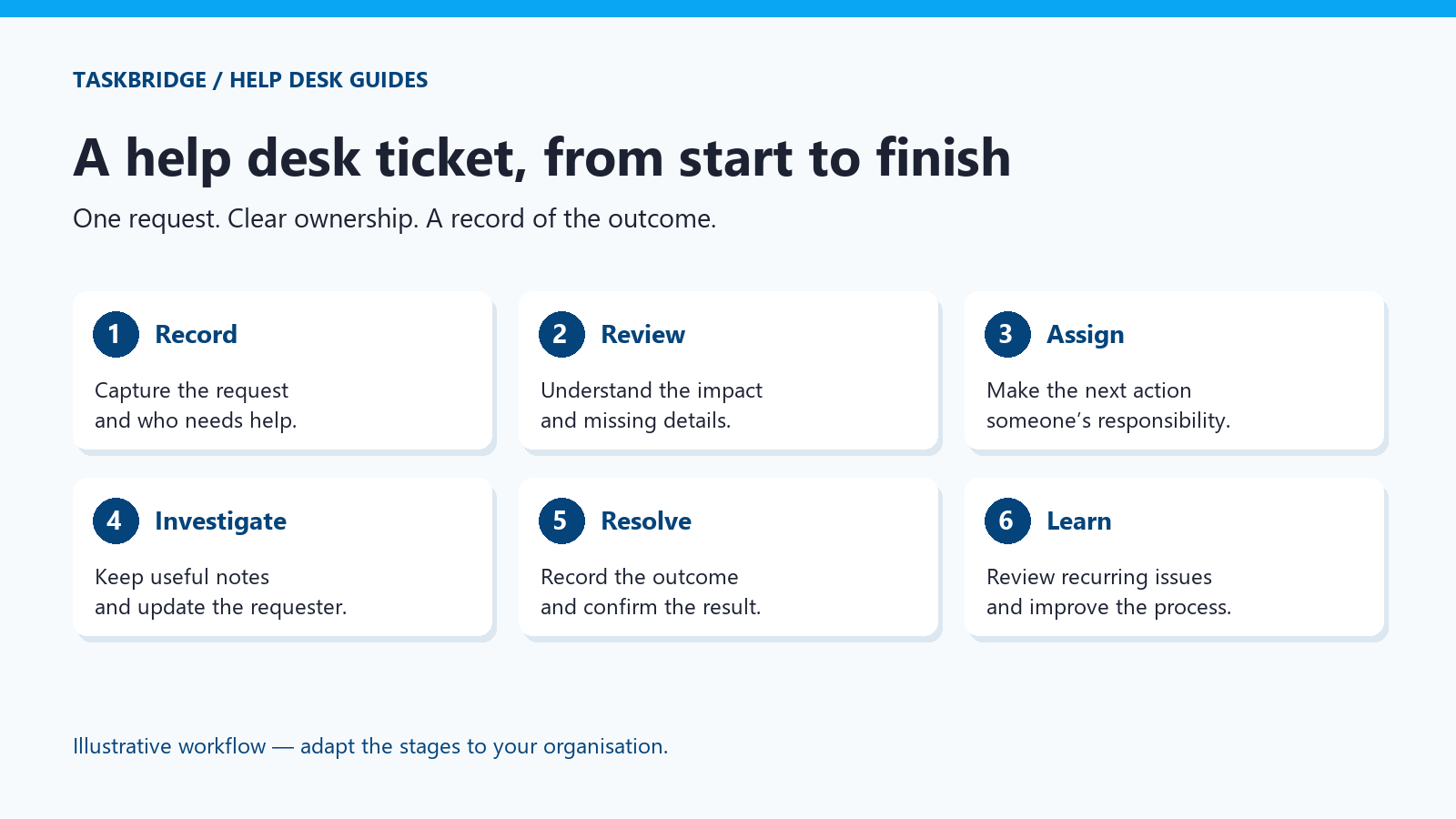
1. Receive and record the request
The request may arrive by email or through a support portal. The important point is that it becomes a visible item in the shared queue. If staff also accept calls, they need a consistent way to record those requests rather than relying on memory.
For external customer enquiries, see how a customer service ticketing system gives each request a visible owner, status and history.
2. Review the information and set a priority
Check whether the ticket describes an incident, a request for access or equipment, or a question. Ask for missing details. Set priority using the impact on work and the urgency of a response; the loudest message should not automatically take precedence.
3. Assign responsibility
A queue is not an owner. Someone must know they are responsible for the next action. If another team needs to help, include the investigation already completed and make the handover explicit.
4. Investigate and communicate
Record what was checked, what was found and what happens next. Keep the requester informed when progress depends on their answer or another party. A short, clear update is more useful than a status change that nobody understands.
5. Resolve and confirm
Describe the fix or the fulfilment of the request. Where appropriate, ask the requester to confirm that normal work has resumed. “Resolved” and “closed” may be separate stages in your process; agree what each means instead of assuming the software’s default wording fits.
6. Learn from repeated tickets
Several tickets about the same fault may point to a wider issue. Review repeated causes, unclear instructions and requests that regularly bounce between teams. Ticket records provide evidence for that review; a closed count alone does not tell you whether the underlying problem has gone away.
Status, priority and ownership are different things
A ticket can be high priority and still be waiting for an external supplier. It can be assigned to an agent while awaiting a requester’s reply. Do not make one field carry all three meanings.
- Status: where the work stands, such as open, in progress, waiting or resolved. These are example labels, not a claim about a particular product’s configuration.
- Priority: how the request should be ordered against other work.
- Owner: who is responsible for following it through, including chasing a dependency.
When a shared inbox stops being enough
Email is a convenient way to ask for help. The difficulty begins when two people reply to the same request, an answer sits in someone’s private mailbox, or nobody can see who is waiting for what. An email to ticket system can preserve that familiar intake channel while adding ownership and history. For the wider concept, see what a ticketing system is.
When evaluating software, test a complete request: submit it, reply to it, assign responsibility and review the history. Ask what happens when two agents work on it, when the requester replies later and when someone leaves the team. Our IT ticketing system guide covers the wider software requirements.
Where TaskBridge fits
TaskBridge is self-hosted help desk and ticketing software for organisations that want to run the system on their own infrastructure. It supports email and portal workflows and is delivered in a Docker container, with full source code under a commercial internal-use licence.
It uses a one-time commercial licence, with support available on request and optional upgrades. Running the software on your infrastructure also means planning for its operation, backups and maintenance. Source code access does not make it open-source software or transfer ownership of TaskBridge’s intellectual property.
For the broader support function, read what an IT help desk does. If you are selecting software, use our help desk solutions checklist to prepare your questions.
See a ticket workflow in practice
Bring a typical support request from your organisation and we can discuss how it would be handled in TaskBridge. Request a demo, or return to Help Desk Guides for related topics.